 EN
 NO
 DK
 SE
 DE



A Pick Up Point location. The place where you can pick up or drop off a key or a thing.

A location with over the counter service. You will find the terminal in the cashier area.

A Chip, you can buy this at the pick-up-point and activate it using the terminal. Attach chip to keyset. Send pick-up codes through the app.

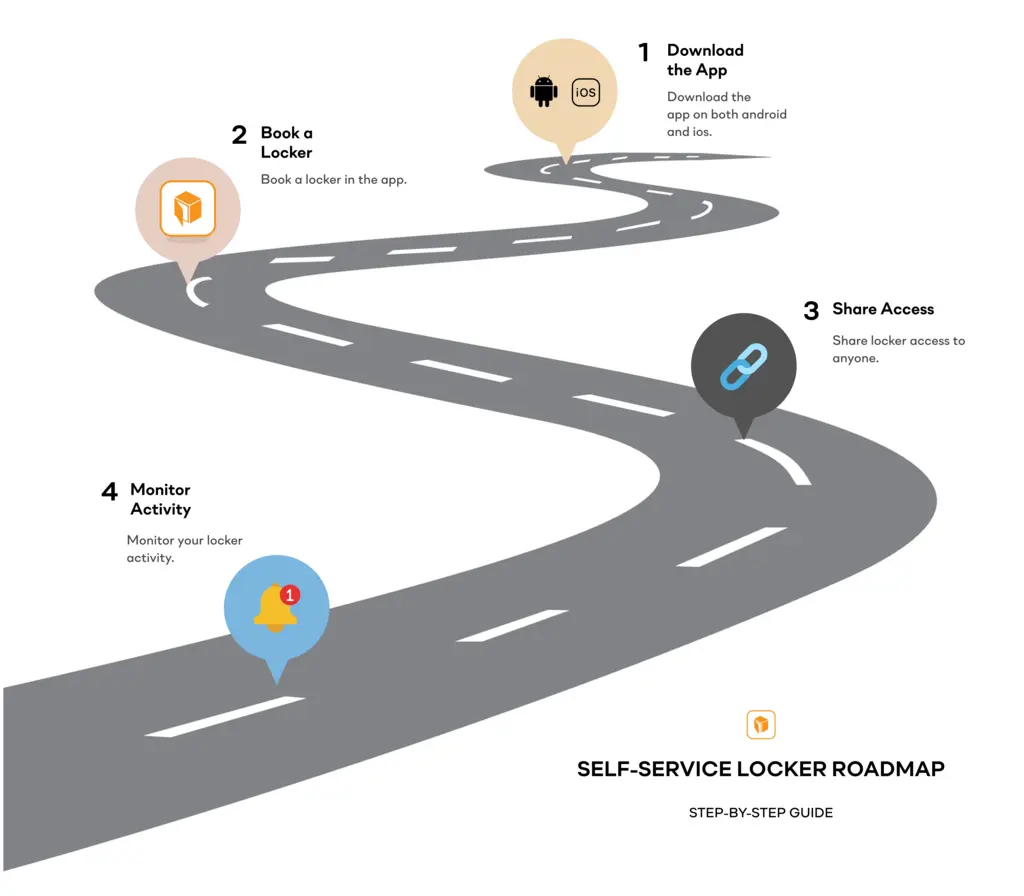
Self service locker at this pick up point. Share access link to open up locker for guest.

Share things on selected locations with easypick THING services. Select between Small or Large items. Use the Easypick terminal.

A locations that opens 24 hours each day. Some days could differ throughout the year.






An Easypick chip is a passive RFID receiver that contains your unique digital identity.
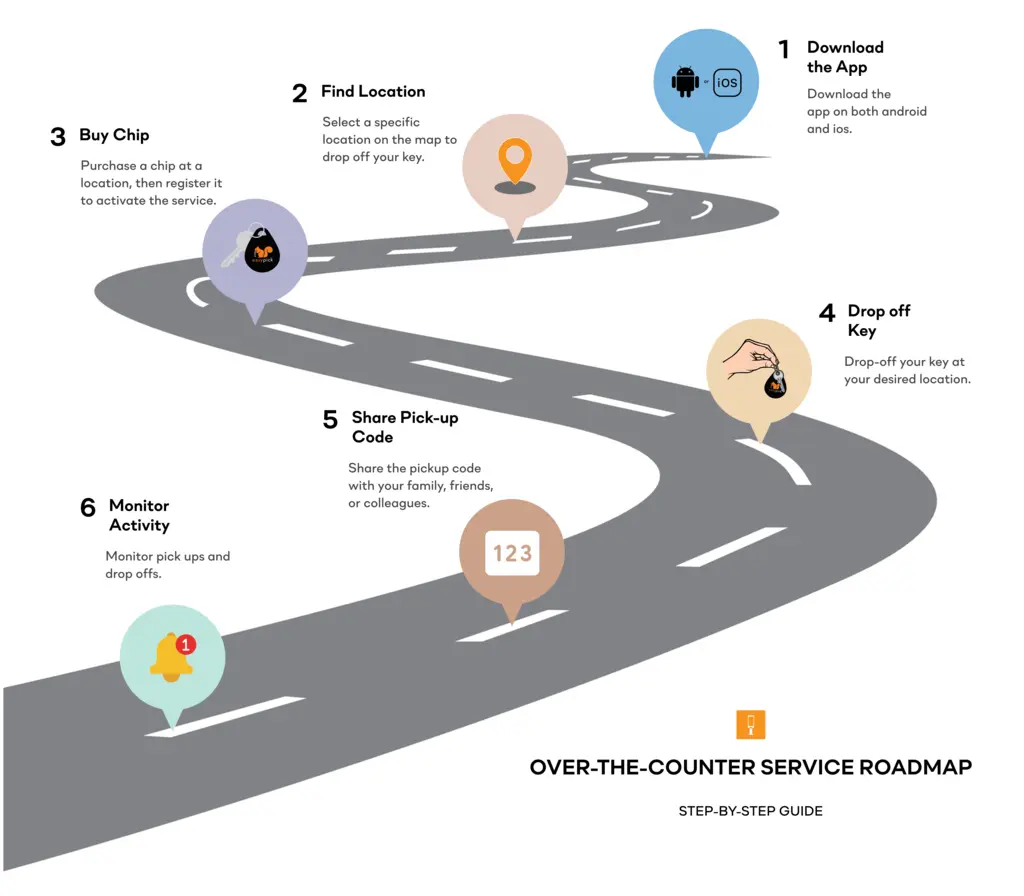
First, buy and activate a CHIP at one of our Pick-Up-Points. Next, attach the CHIP to the keychain, and drop it off by scanning it on the Easypick terminal. Finally, share the Pick-Up Code in this app with the person who will pick up the key. Enter the Pick-Up Code on the terminal to pick up the key.
Go to your nearest Pick-Up-Point, buy a chip and activate it on the terminal. The chip will automatically appear in the app.
All chips must be activated in the terminal. Chips that are not activated in the terminal are inactive and will not provide access to the Easypick app and service. Press “NEW CHIP” on the screen in the terminal and place the chip at the opening in the bottom of the terminal. Follow the simple on-screen instructions. The instruction can be displayed in either Norwegian or English.
A chip can only be used to drop off a key, and can not be exploited by a third party. You may deactivate your chip after clicking the More options button on the bottom of the key page.
Yes! You may move your chip to another person’s phone number/Easypick account under the More options button at the bottom of the key information page. The recipient does not need to have an Easypick account in advance. This service is free of charge.
Yes, let us know and we’ll move the chip to the other account. Approval from the new user is required.
No! Your keys can be in storage as long as you wish at any location. However, please be aware that if you do not have an Easypick UNLIMITED subscription you will be charged NOK 49 for each initiated 24-hours of storage time. Please see Membership plan under Account Settings in this app for more info.
Yes, the chip can be used on all Pick-up points that offer Easypick service. Please see locations here.
No, you only need the Pick-Up Code to pick up the key, and only the CHIP to drop it off again. Only the owner of the key needs to have the app in order to manage the Pick-Up Codes.
No, only the key owner needs to download the app. You only need to manage and send a simple pick-up code to the person who will pick up the keys and you´ll receive a simple push notification in the app when your keys has been picked up. You can choose the notifications via Push (free), email (free) or SMS (5,- NOK per sms)
You can try the following solutions:
Press “Forgot password” and follow the instructions described in the app.
It will be fine, go in the app and click on “change user”.
Go under my profile, delete user.
Yes, you can deliver your keys at all Pick-Up Points that offer the Easypick service.
No worries, leave your keys, with chip, as normal to the staff and let us know through the support for Easypick, and we´ll assist you. If the key is to be picked up, contact us, and we will assist with remote assistance. We will ask for identification when the keys are retrieved.
Opening hours may vary between locations and can change during weekends, public holidays and other holiday periods.
We recommend checking the store’s current opening hours before dropping off or collecting your keys. To avoid any issues, please make sure to collect your keys well before closing time, preferably at least 2 hours in advance.
If you’re unsure about the opening hours, please contact the store directly to confirm.
Consists of a 6-digit code that you will find inside the Easy Pick app. In the main menu, tap “My keys” and select your chip. New pick-up codes are automatically generated in the app when handing in keys with a chip on Pick-Up-Points.
Yes, go to the section for “my keys”, tap on your chip and press the orange button “pre-generate pickup code” – send the pickup code with a link to the user.
Yes, you can upgrade to fixed retrieval code inside the app. This only applies to users who have an Unlimited subscription. Go into the app and press “Upgrade to fixed retrieval code”.
These are the steps on how to use the service.
For new users:
You need to download the app and select a subscription that suits your needs either DAILY, MONTHLY or YEARLY subscription. You can visit the pricing for detailed information.
You can store keys or any portable things.
There are two subsription for this service: SMALL and LARGE. SMALL for a carrier bag size and as for LARGE for a larger carrier bag. For more information, you can visit the Pricing page.
There are two subsription for this service: SMALL and LARGE. For SMALL, it only cost 39,- NOK and for LARGE costs for 79,- NOK. For more information, you can visit the Pricing page.
Please contact Easypick Support by sending message to support@easypick.no or make a call to +47 23 65 33 01
You will receive a Push / Email stating that you have kept over the max limit of more than 14 days and will be asked to pick up the item immediately. On exceeding storage times will your object be delivered to your local lost property office. Please note that the location and Easypick may charge an administration fee for removing the item from the location.
It happens once in a while that you are unlucky and lose your keys. If you have a Chip from Easypick, it is described on the back: “If found, please contact Easypick”. When Easypick Support receives inquiries about keys that have been found on the street, we register it in our system and follow up on keys that have been recovered again. It may also happen that you suddenly get a push notification that your keys have been delivered to the closest Pick-Up Point. The most important thing you can do is let us know and we’ll try to help you as much as possible. Remember to block your chip. Your ID is safe.
Keep your key set as minimalistic as possible, optimally, only 1-2 keys + a chip attached to your keychain. Never put information or characteristics on the key set that can identify your identity or the use of the key.
All keys are kept safe and secure in our key cabinets of steel that are mounted on the wall behind the cashier. The key cabinets are only operated by staff and the staff is responsible for handing over the keys.
Yes, Easypick never stores your card information. You can rest assured after you delete your profile, all details will be removed.
Each user has a unique account which they can only access with their credentials such as phone number and passwords. Keep your credentials private and secure, don’t share them with anyone else.